My local k0s dev cluster
I often find myself testing kube manifests locally as a “back-of-the-envolope” style of devops to a) make sure I understand what i’m deploying, and b) to quickly check how feasible it is to deploy. Connecting to an existing cluster running real workloads obviously isn’t the best way to do this, and even dev clusters are oftentimes actually just prod environments in disguise.
I’ve found myself repeating this setup enough times to warrant writing down the steps somewhere for my future self, as well as for anyone who’s interested.
Installing k0s nodes
My setup on macOS involves 2 layers: a Lima virtual machine inside which is running a lightweight kube distro, usually k0s.
Originally, I was only running k0s on bare-metal, but I found the port mappings usually conflicted with other projects I was working on.
Running each node inside its own virtual machine is great since I can shut down the VMs when I’m not using them, then spin them back up from snapshots later. There’s also the fact that installing untrusted code directly on your host machine probably isn’t the safest.
I’ve borrowed this idea (kube in a vm) from this incredible series on kubernetes. I highly recommend checking it out both for its technical depth, as well as for french practice.
I should also note the idea itself isn’t inherently my own, Lima provides great docs showing how you can accomplish a similar setup using k3s. If you plan on following along, definitely make sure limactl is installed.
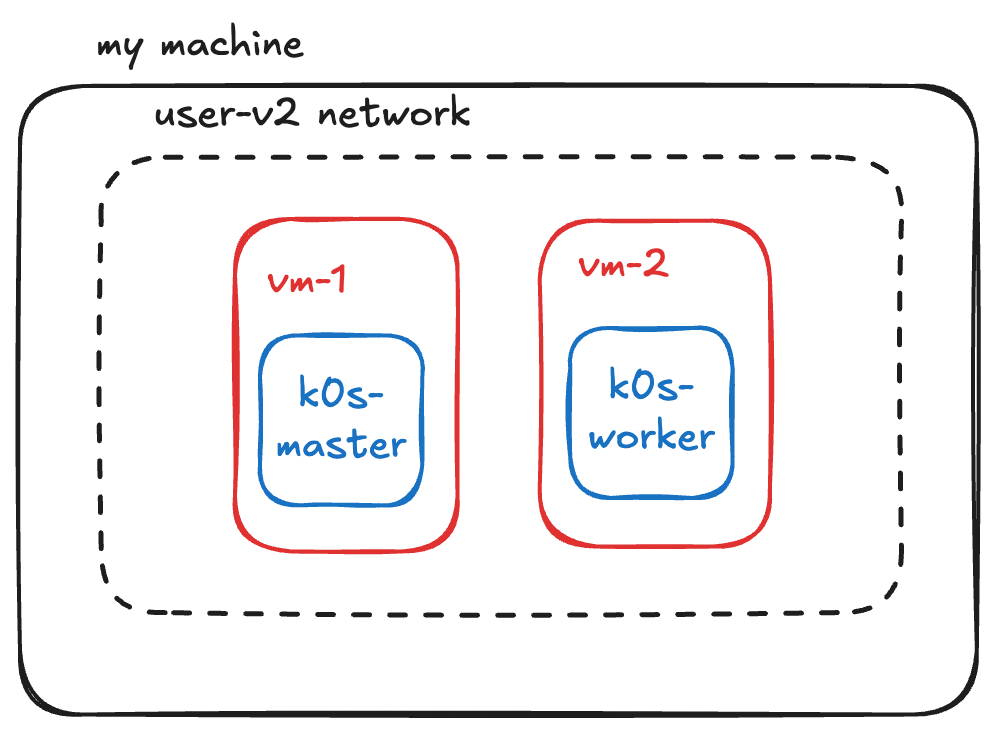
Loosely the multi-node setup looks like this:
- Boot first vm running k0s control-plane
- Create and export join token
- Boot second vm with join token above running k0s worker node
- Debug
To simplify things, I’ve written a template that can be directly referenced in the limactl create command. I encourage you to read the source code here.
To install the control-plane we can start a vm with
❯ TEMPLATE_URL="https://codeberg.org/nnethercott/k0s-lima-multinode/raw/branch/main/templates/k0s.yaml"
❯ limactl create --name k0s-master $TEMPLATE_URL
❯ limactl start k0s-master
Our template conveniently generates a kube config which you can use to connect to the cluster.
Make sure everything is running
❯ export KUBECONFIG="$HOME/.lima/k0s-master/copied-from-guest/kubeconfig.yaml"
❯ kubectl get no
NAME         STATUS   ROLES           AGE   VERSION
lima-k0s-master   Ready    control-plane   19s   v1.36.1+k0s
Now we need to generate the token which subsequent workers can use to join. This can be done as follows;
❯ limactl shell k0s-master sudo k0s token create --role=worker
The final step here is to rerun the limactl create command again, but this time passing a special --param argument.
❯ limactl create --name k0s-worker $TEMPLATE_URL --param token="<copied-from-stdout-above>"
❯ limactl start k0s-worker
We can check the worker node connected properly by checking the nodes once more:
❯ kubectl get no
NAME              STATUS   ROLES           AGE    VERSION
lima-k0s-master   Ready    control-plane   9m5s   v1.36.3+k0s
lima-k0s-worker   Ready    <none>          22s    v1.36.3+k0s
A basic deployment
To make sure everything looks good let’s spin up a basic nginx deployment:
❯ k create deploy sanity --image nginx --replicas 2
deployment.apps/sanity created
❯ k get deployments,pods --show-labels
NAME                     READY   UP-TO-DATE   AVAILABLE   AGE   LABELS
deployment.apps/sanity   2/2     2            2           14s   app=sanity

NAME                          READY   STATUS    RESTARTS   AGE   LABELS
pod/sanity-855d679dd6-8sg4p   1/1     Running   0          14s   app=sanity,pod-template-hash=855d679dd6
pod/sanity-855d679dd6-nppms   1/1     Running   0          14s   app=sanity,pod-template-hash=855d679dd6
Voilà !
Debugging Bonus
When playing around with this cluster for a few weeks I ran into an annoying gotcha. The token we registered the worker node with uses the hardcoded ip address of the master node, so when this changes (e.g. on computer reboots) we fail to register the worker node.
One way you can detect this is by exec-ing into the worker vm and inspecting journalctl outputs:
❯ limactl shell k0s-worker sudo journalctl
You should notice something like Aug 02 23:35:02 lima-k0s-worker k0s[2554]: time="2026-08-02 23:35:02" level=info msg="No cached API server addresses found"
One way to resolve this is to manually re-encode the kubeconfig following #431, but the easiest is probably just to spin up a new worker vm following the steps above